

Everything Unreel does today lives in one corner: glitch, scan and signal. This is the rest of the map — 91 moves in 12 buckets, from smooth and wispy to hard and chaotic, mask reveals, X-ray and vision, and a new bucket that only exists because your Mac can cut the athlete out of a photo by itself. Every card is tagged as a cut (how one shot hands off to the next) or a reveal (what happens inside one shot), with an energy level and how hard it is to build. Mark each one Build / Maybe / Cut — your picks stay in this browser — then hit Copy my picks and paste them back to me.
Right now every effect is written twice — once in Python for the render, once as a GPU shader for the live preview — and they have to be kept in step by hand. That's fine for 12 moves; it breaks at 80. The fix is to have the render use the same GPU shaders as the preview, running off-screen at 1080×1920.
What that buys: each new transition is written once, the preview becomes exactly the render instead of a close sketch, and renders get several times faster because the graphics chip does the work instead of the processor. I'd do this first — it's a few hours — and every transition after it costs half as much.
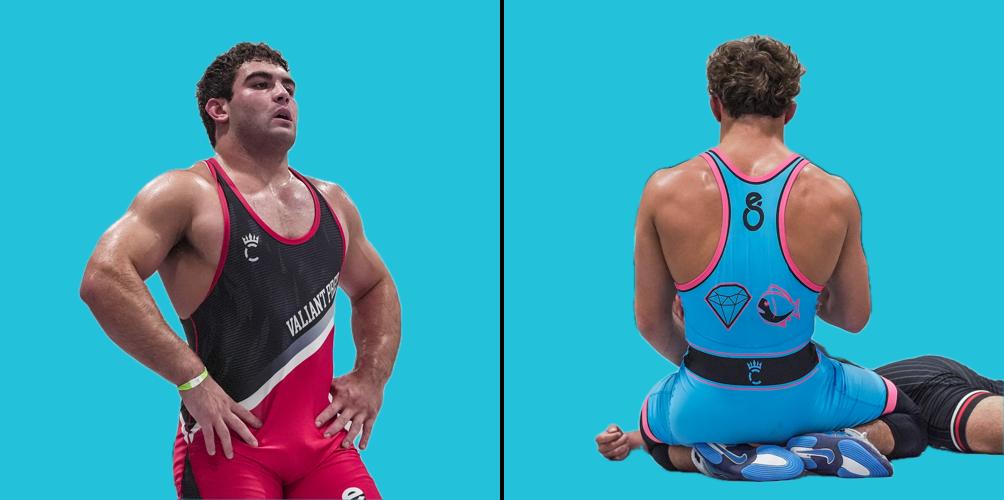
macOS has Apple's subject cut-out built in (it's what "Lift subject from background" uses in Photos). I tested it on two of our frames: clean athlete masks in about 3 seconds, on the Mac, free. That opens the Athlete Cut-out bucket below — the athlete stays while the world swaps, pops out over the logo, gets a teal halo, turns into a sticker.
JT Smith and the Diamond Fish back, cut out automatically and dropped on brand teal. Note the opponent's legs came along on the right — we'd keep only the biggest subject.