How UNRL is actually built, and how we build ours on the same theme.
Pipeline is purchased. Before we touch Shopify Admin, this is the navigation, mega-menu, and product-page architecture UNRL runs in production on that exact theme — pulled from their live site, not guessed — mapped onto what Compound actually sells. Everything below is real: real nav links, real filter facets, real PDP copy, captured off unrl.com today.
Where this picks up
Fast recap so this page stands on its own.
Theme & direction
Pipeline is bought — the same theme UNRL's live site runs on (confirmed twice: schema_name: "Pipeline", theme store id 739, checked again today). Design direction from the reference board holds: gritty tone, real photography only, four distinct department moods rather than one blended look.
Catalog audit
All 312 products checked. 100% missing SEO fields, 79% untagged, vendor field spelled 4 ways, real option-name typos, 13 products oversold. The 13 oversold items are already fixed live (inventory corrected via the Shopify Admin API, verified). The rest of the cleanup — categories, tags, vendor standardization — is scoped and approved to start (Phase 1 of the rebuild plan), independent of the theme work below.
What we actually sell
Two rounds of concept mockups got this wrong before landing right: Compound retail is general athleticwear first — graphic tees, embroidered fleece, joggers — not a wrestling-competition-gear storefront. Sublimated fight shorts and singlets are one department inside that (training/semi-intense mood), licensed/PNL apparel is another (gameday mood), Wrstlg Dept is a third (streetwear, off-the-mat mood). This page's nav mapping is built on that corrected structure.
Nav mapping & hub naming
Wrstlg Dept keeps peer-department billing next to Men/Women. The partnerships hub is named Collabs — Stilly Boys, Elite 8, PNL, and licensed college apparel all live under it, same shape as UNRL's University Collection sitting inside Collaborations. Team & School Orders in the footer is a traffic-driver link pointing off-site to the teamwear/Chipply store business, not a product category the retail site sells directly. Deals is overflow/clearance stock. Details on each below.
UNRL's real navigation and site flow
Pulled directly off unrl.com's live DOM today — every link below is real, not inferred from a screenshot. This is what "the UNRL theme" actually means in practice.
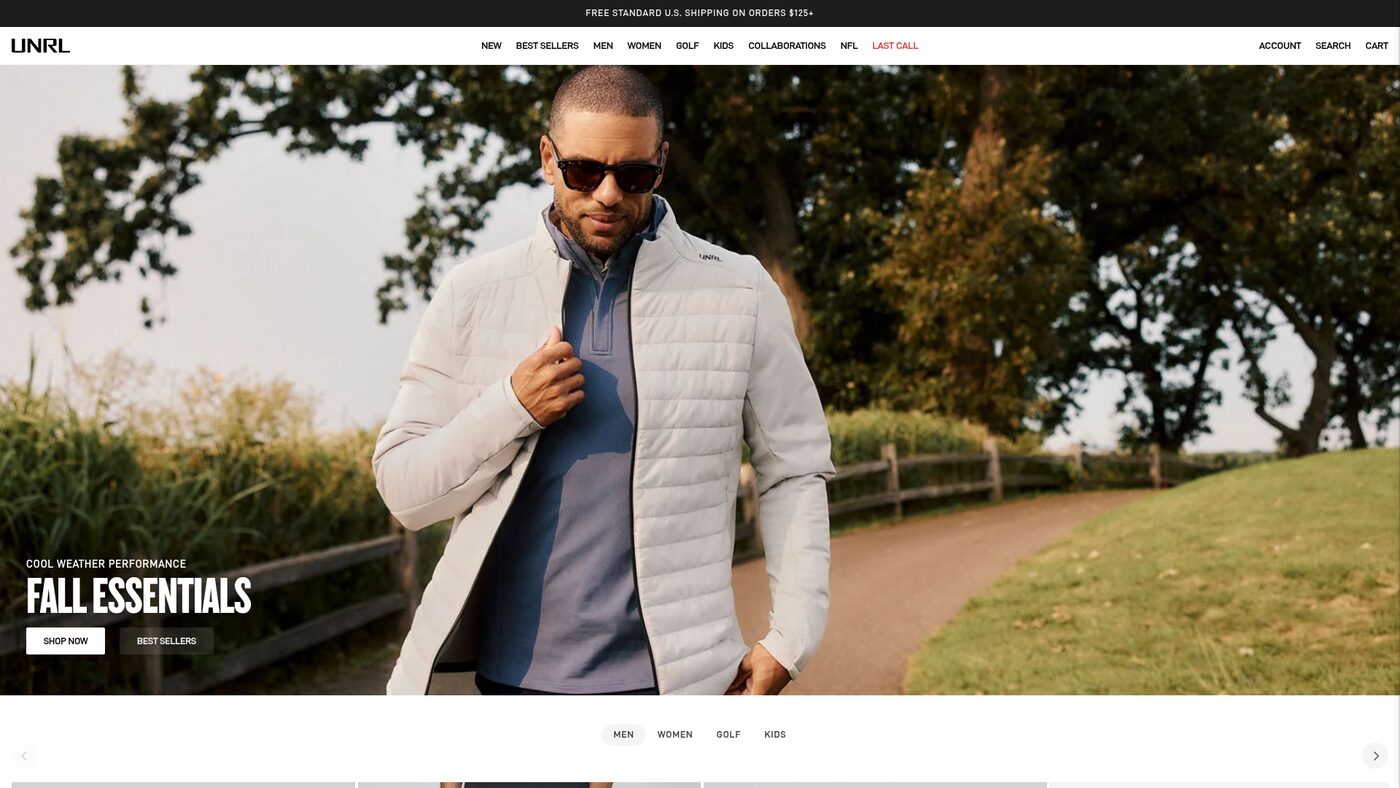
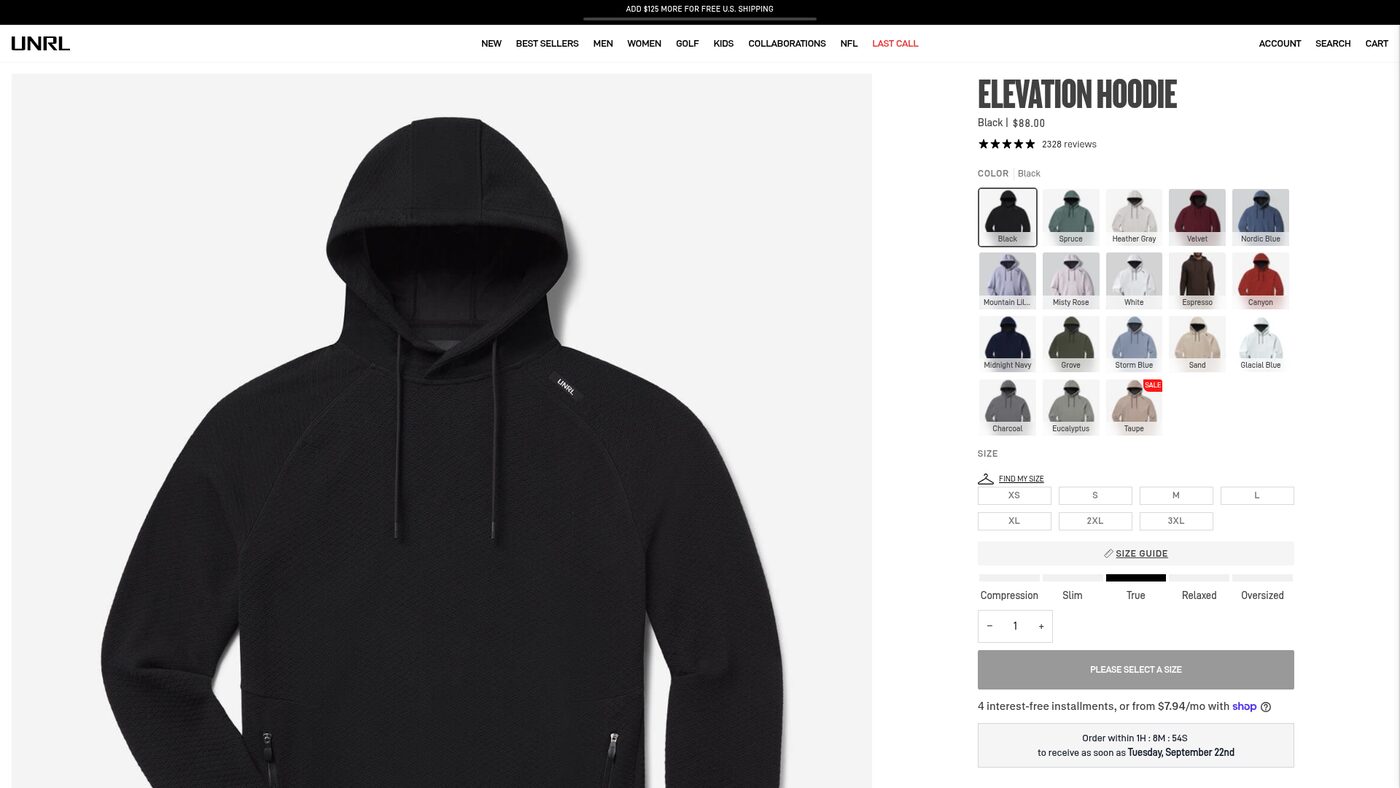
The top nav is nine slots: two merchandising shortcuts (New, Best Sellers), three peer departments (Men, Women, Golf), one flat link (Kids — no dropdown), one partnerships hub (Collaborations), one rotating featured drop (currently their NFL capsule), and Last Call in accent red. Every department mega-menu follows the identical column pattern:
Mobile: hamburger opens a full-screen drawer — search bar first, then the same top-level items each with a chevron for drill-down, Last Call still in accent color. Homepage: full-bleed hero (photo, oversized headline low-left, two CTAs — this is exactly the skeleton the reference board already locked in from Pas Normal), then a pill-tab row (Men / Women / Golf / Kids) that filters a product carousel right on the homepage without a page load. Announcement bar: a live free-shipping progress bar, not just static text.
Mapping UNRL's architecture onto Compound
Same skeleton, our departments. This is the actual information architecture I'd build in Pipeline's navigation settings.
The product page, top to bottom
This is the exact stack Cliff called out as "bad fucking ass" on the reference board — laid out here in full, in order, from the live page. Green badges are things Pipeline ships natively; red badges need an app decision.
Image gallery NATIVE
9 images on the hoodie we checked, zoom-enabled. Pipeline's media gallery handles this out of the box — this is a photography-supply problem, not a build problem. Ties straight back to the catalog audit: 73 of our 312 products have no featured image at all today.
Color swatches as real photo crops NATIVE
18 colorways on one style, and every swatch is a cropped photo of the actual garment in that color — not a flat color dot. Pipeline's variant picker supports this directly off variant images. Needs the shot list to include one image per colorway at minimum, which is the same "one shooting standard, enforced" rule the earlier Grid pattern already established.
Size picker + Find My Size APP
Standard size buttons, a "Find My Size" quiz trigger, a Size Guide link, and a visual fit-scale bar (Compression → Slim → True → Relaxed → Oversized) with a marker showing where this exact style sits. The buttons and size guide are native Pipeline. The quiz is a sizing app (Kiwi Sizing, Fit Finder, or similar) — a real subscription decision, not a default.
Shipping urgency countdown APP
"Order within 1h 15m to receive as soon as Tuesday" — a live countdown tied to real shipping cutoffs. Cheap conversion lever, needs a small app or a custom Liquid snippet keyed to carrier cutoff times.
Description + Specs / Wash accordions NATIVE
A short description paragraph, then two collapsed accordions (Specs, Wash Instructions). Standard Pipeline product template content — this is a copywriting task against our metafield standard from the catalog audit, not a build task.
Mid-page conviction line NATIVE
"THE HOODIE WE CAN'T KEEP IN STOCK." set big, on its own, between the fold and the feature bullets. Pure copywriting + a content section — no app needed.
Feature bullets NATIVE
Three short technical claims (fabric, hood construction, pockets) as a simple bulleted block. This is the metafield-driven "spec list" pattern from the catalog-rebuild spec, presented as PDP content rather than buried in a description field.
Shop-the-look / complete-the-fit APP
The hoodie is shown paired with its matching short as a 2-up "wear it together" block. This is a product-relationship feature — either a metafield reference we maintain manually per style, or a cross-sell app. Directly useful for us: Momentum jacket + jogger is the exact same pairing opportunity we already have in the catalog.
Related colorways / complete-the-collection carousel NATIVE
Same style shown in five other colors plus the matching short, with live sale pricing on one. Native Pipeline "related products" section driven off collection or tag rules — no app needed once tagging is clean.
Rich reviews with fit & use-case data APP
2,328 reviews, a star histogram, a crowd-sourced "fits slim / fits looser" poll, a size-purchased breakdown, and a tag cloud of what customers use the product for (Training, Casual Wear, Travel, Golf...). This is a real reviews platform — Judge.me, Yotpo, or Okendo — not a Pipeline default. The "recommend this for" tag cloud is genuinely useful merchandising data and doubles as free customer research once it's live.
Collection pages & the homepage carousel
Also pulled live off the DOM — real Pipeline component and class names, confirming these are stock theme behaviors we get for free once the catalog data backs them.
Filter facets
The real sidebar filter groups on a live collection page, in order: Gender, Size, Product Type, Product Colorway, Price, Availability. This is Pipeline's native filter system reading real product data — every one of these facets needs its source field clean and consistent, which is exactly the option-name and category work already scoped in Phase 1 of the catalog rebuild.
Per-variant grid image
Product cards use a real Pipeline component (<product-grid-item-variant>) that swaps the card image to match whichever colorway is active — the card shows the price and color name of whatever's selected, not just a static default photo. Depends on every variant having its own image, which again comes back to photography completeness in the catalog.
Tabbed department carousel
Below the hero, a pill-tab row (Men / Women / Golf / Kids) swaps a horizontal product carousel in place without a page load. This is a stronger homepage merchandising pattern than the static "New Arrivals" grid in the current concept mockup — worth building into the next mockup revision. Maps to our departments as Men / Women / Wrstlg Dept / Youth.
The build plan, sequenced
Same phase numbering as the original audit, extended with the theme work this research unlocks.
Catalog cleanup
Vendor field, option names, categories, tags, dead-stock and sample-product cleanup. The 13 oversold items are already fixed. Adds one new item this round: an internal-only POD fulfillment flag for the licensed-college SKUs, kept out of every customer-facing field. This has to land before the filter facets and per-variant grid images above will work correctly.
Marketing plumbing
Meta/TikTok pixels, UTM discipline through the Link & QR Studio, the Chipply-to-Mailchimp merge. Doesn't touch the theme at all — keeps running alongside everything below.
Pipeline setup & navigation
Install Pipeline on a staging/unpublished theme. Build the nav structure from the mapping table above: Men / Women / Wrstlg Dept / Youth / Collabs / Deals, with Team & School Orders moved to the footer. Configure the mega-menu columns and the New/Best Sellers shortcuts, and give the Collabs hub a merchandising layout that weights college apparel as its largest block.
App decisions & PDP build
Choose the reviews platform, the size-finder app (or skip it for now), and whether to build a loyalty/referral program. Build the PDP template against the 10-part anatomy above, in the four department moods already locked (general retail, training/semi-intense, gameday, streetwear) — college-licensed PDPs read identically to every other product page, with the POD flag from Phase 1 driving fulfillment only, never copy.
Redirects & remeasure
Full 301 redirect map before publishing — still the single highest-risk step in a rebuild. Remeasure against the baseline from the audit: ~90 sessions/day, 0.39% conversion.
What I need back
Nav mapping's confirmed. Two real decisions left, plus one green light.
- Pick the reviews platform. Judge.me, Yotpo, or Okendo — this decides whether we can ship the fit/use-case data UNRL uses as real merchandising signal, not just star ratings.
- Size-finder app: yes or skip for now? Not required to launch — flagging it as a deliberate call rather than a default.
- Green-light Phase 3. Installing Pipeline on staging and building the nav structure (Men / Women / Wrstlg Dept / Youth / Collabs / Deals, Team & School Orders in the footer) can start immediately — no open blockers on the mapping itself anymore.